If you’re learning Japanese using AJATT, Refold, or other methods, you are familiar with Anki, and you know about sentence mining: finding real Japanese sentences, extracting them, looking up words, and creating cards. It is a manual work that sometimes becomes bothersome.
So, inspired by https://sentencesearch.neocities.org, I built Jitori, a sentence bank for Japanese learners. It is a searchable database of 58k+ real Japanese sentences with audio, dictionary lookups, and one-click Anki export. It also handles conjugated verbs, which is something most tools get wrong. It is free, open-source, and you can check the code on GitHub.
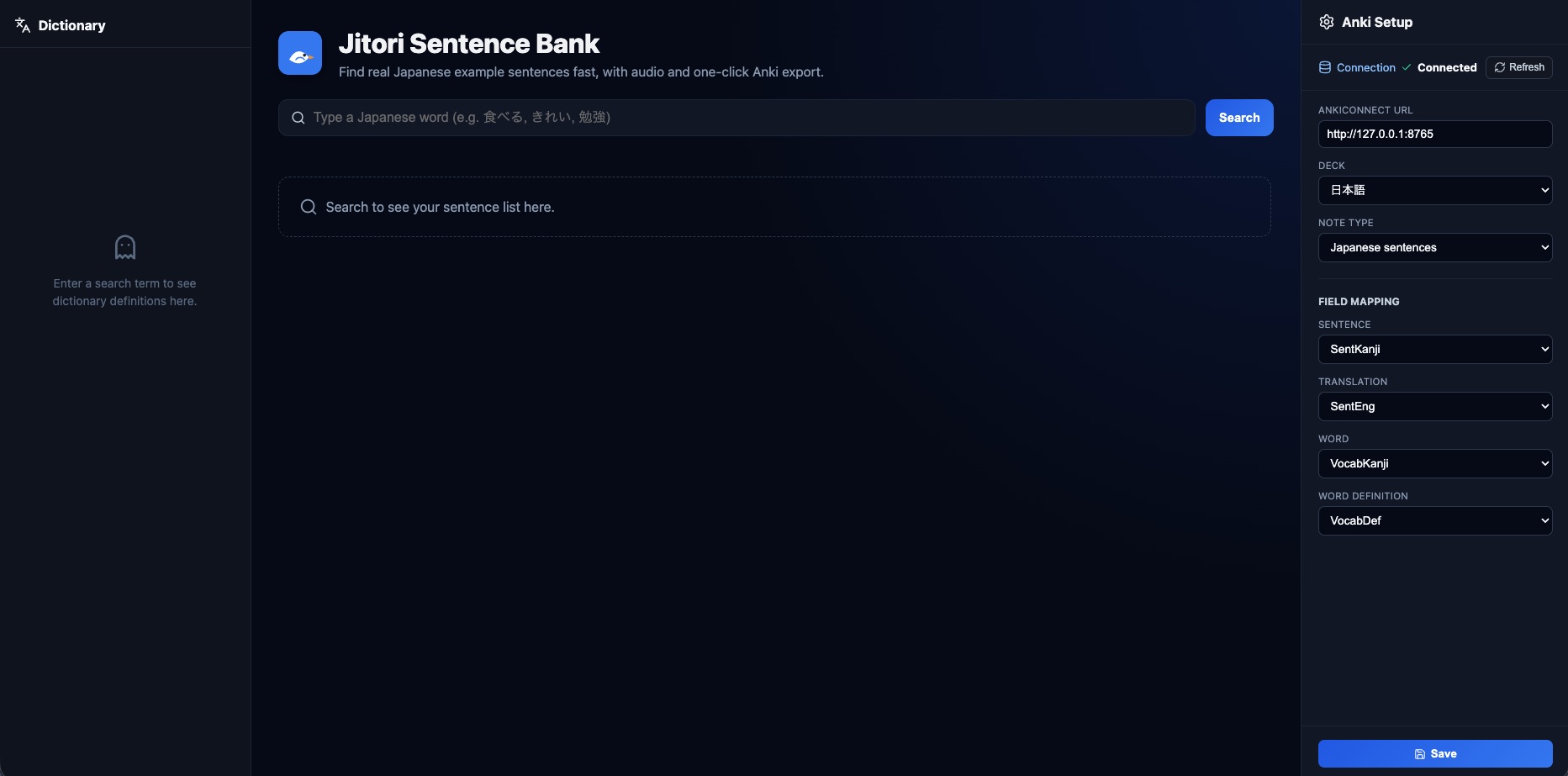
Jitori Interface
Mining sentences from anime worked well for me. I would watch an episode with Japanese subs on mpv, use mpvacious to grab a sentence, and create an Anki card. Solid workflow.
But I also like to read manga, and from time to time I always encounter an unknown word in written media. My approach was to copy it to a text file to create a card for it later. To create a card for it, I usually searched the word on Jisho then searched it in sentence packs, then proceeded to create the card by manually copying/pasting each field. Doing one or two cards is okay, but when you need to do a batch of 20, it becomes a pain.
How Jitori works
The app has three panels:
Dictionary panel on the left searches JMdict and KANJIDICT as you type. If you search a conjugated word, it detects the base form and shows the relevant dictionary entry. It also breaks down each kanji with meaning, readings, JLPT level, stroke count, and frequency.
Main panel in the center is where the sentences live. Type a word, get real sentences containing it. Each card has the Japanese sentence, English translation, a play button for audio, a download button, and an export to Anki button. The export to Anki button opens the Add model via AnkiConnect.
Anki settings on the right lets you configure which deck and note type to use, map fields like Sentence, Translation, Word, and Audio, and save the configuration. The connection status indicator tells you if Anki is reachable.
What makes it different
You search for 食べた (ate) in a normal sentence bank and get nothing because the database only has 食べる (to eat). Jitori handles conjugations (in a bit of a sloppy way at the moment) by detecting the base form and searching for it. This was my problem using Ankidrone Sentence Pack.
Another problem I had, using the alternative https://sentencesearch.neocities.org was that the export to Anki button simply didn’t work properly.
The tech stack
The frontend is SvelteKit, the database is Cloudflare D1 (SQLite on the edge), and the audio files are stored in Cloudflare R2. The data pipeline uses Python scripts to parse JMdict and KANJIDICT XML files (around 226k dictionary entries) and the 58k sentences from Ankidrone Sentence Pack into D1. It is all deployed on Cloudflare Workers, which means it is fast and costs almost nothing to run. The repo is here if you want to self-host it.
Feel free to open PRs, issues, or fork it and move to another provider if you want to.
Regarding data, all the sentences in Jitori come from the Ankidrone Sentence Pack, which in turn came from https://sentencesearch.neocities.org. The origin of these sentences is a mix of sources such as iKnow, jpod101, tatoeba, bunpro, lingodeer, Satori Reader, and many others.
Planned features
Right now, Jitori does what I need: search sentences, look up words, and export to Anki.
I have no extra features in mind besides improving what is already there, such as better search, adding more sentences, and UI/UX improvements.
Anyway, give it a try. It is at jitori.davidmartins.net.